Global IME Dashboard Customization with GlobalSmart Plus app

27th April 2026, Kathmandu
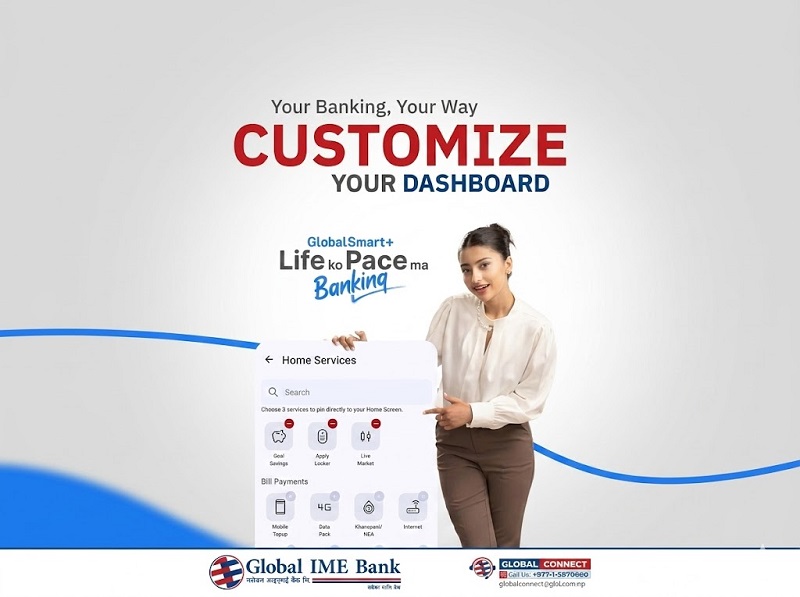
Global IME Bank, a pioneer in digital innovation, has introduced a highly functional “Customize Your Dashboard” feature within its flagship Omni-channel app, GlobalSmart Plus.
Global IME Dashboard Customization
This feature allows users to move beyond a static banking interface and design a workspace that reflects their individual financial priorities—be it daily bill payments, long-term savings goals, or real-time stock market tracking. By putting “Your Banking, Your Way,” the bank is setting a new standard for user-centric digital finance in the new year 2083 BS.

How to Customize Your GlobalSmart Plus Dashboard
The new dashboard customization tool is designed to be intuitive and fast. Users can pin their most frequently used services directly to the home screen, reducing the number of clicks required to complete a transaction.
Follow these simple steps to personalize your app:
Log In: Open your GlobalSmart Plus app using your secure credentials or biometric authentication.
Access Home Services: Look for the “Customize” or “Home Services” section on your main screen.
Select Your Top 3: The app allows you to choose up to 3 core services to pin directly to the top of your dashboard.
Drag and Drop: You can toggle between various categories such as Goal Savings, Apply Locker, Live Market, and various Bill Payments.
Save Changes: Once you have selected your preferred layout, tap the confirm button to see your personalized interface every time you log in.
Key Services You Can Pin to Your Home Screen
The power of customization lies in the variety of services integrated into the GlobalSmart Plus ecosystem. In 2026, the app has transformed from a simple payment tool into a comprehensive financial hub.
Goal-Based Savings: Monitor your progress toward major milestones, such as a new home or education fund, directly from your home screen.
Advertisement

Bill Payments: Pin utilities like NEA (Electricity), Khanepani (Water), Internet, or Data Pack purchases for one-tap payments.
Live Market and NEPSE Updates: For active investors, pinning the “Live Market” feature provides real-time stock price movements and market indices without navigating through menus.
Mobile Top-up: Keep your Ncell or NTC balance updated with the most frequently used “Top-up” shortcut.
Security and Connectivity in 2083 BS
While the bank focuses on convenience, digital safety remains a high priority. Global IME Bank continues to educate its users through “Global Money Week 2026” programs, emphasizing that personal security details like OTPs and transaction PINs should never be shared.
For any technical assistance or if you encounter a “Scam Alert” involving fraudulent links as highlighted by Mahalaxmi Bikas Bank, you can reach out to “Global Connect,” the bank’s 24/7 customer support center.
NCell Toll-Free: 18102077777
NTC Toll-Free: 16600121314
Global Connect Landline: +977-1-5970600
Expanding the Omni-channel Experience
The “Customize Your Dashboard” feature is available across both the mobile app and the web-based internet banking platform. Since GlobalSmart Plus uses a single sign-on credential, any preferences you set are synced across your devices, ensuring a consistent experience whether you are on your smartphone or your PC. This integration is particularly useful for businesses that need to manage large volumes of government payments, CIT, or SSF contributions through a tailored interface.
Conclusion
The ability to customize your banking dashboard in 2026 is more than just a cosmetic update; it is a tool for better financial management. By organizing your most important tasks—from gold loans at NIC ASIA to your daily savings at Global IME—you take control of your time and your money. As we enter the month of Baisakh 2083, take a moment to explore the settings in your GlobalSmart Plus app and build a dashboard that truly works for you.
For More: Global IME Dashboard Customization